Affirm
Overview
Affirm is a Buy Now, Pay Later (BNPL) payment method. It allows customers to purchase goods and services and pay in installments.
At checkout, customers can:
- Select Affirm.
- Complete a quick application, which involves a soft credit check.
- Choose from flexible payment plans, such as Pay in 4 with four interest-free payments or monthly installments ranging from 3 to 36 months.
The annual percentage rate ranges from 0 percent to 36 percent, depending on credit and loan terms.
Affirm is mainly used in the United States and is supported by many retailers. For more information, refer Affirm
Prerequisites
To offer the Affirm payment method through the Mastercard Gateway:
- Register with your payment method service provider.
- Register with Affirm as a merchant.
- Configure your merchant profile in Mastercard Gateway using the details provided by your payment provider.
Payer journey flow
The payer journey flow includes:
- The customer selects products or services and proceeds to checkout.
- The customer provides basic details, such as name, email, phone, and address.
- The customer selects Affirm as the payment method.
- The customer is redirected to the Affirm page and logs in.
- The customer authorizes the payment.
- The customer is redirected back to the merchant site with the payment status.
- If the payment fails, the customer can choose another payment method.
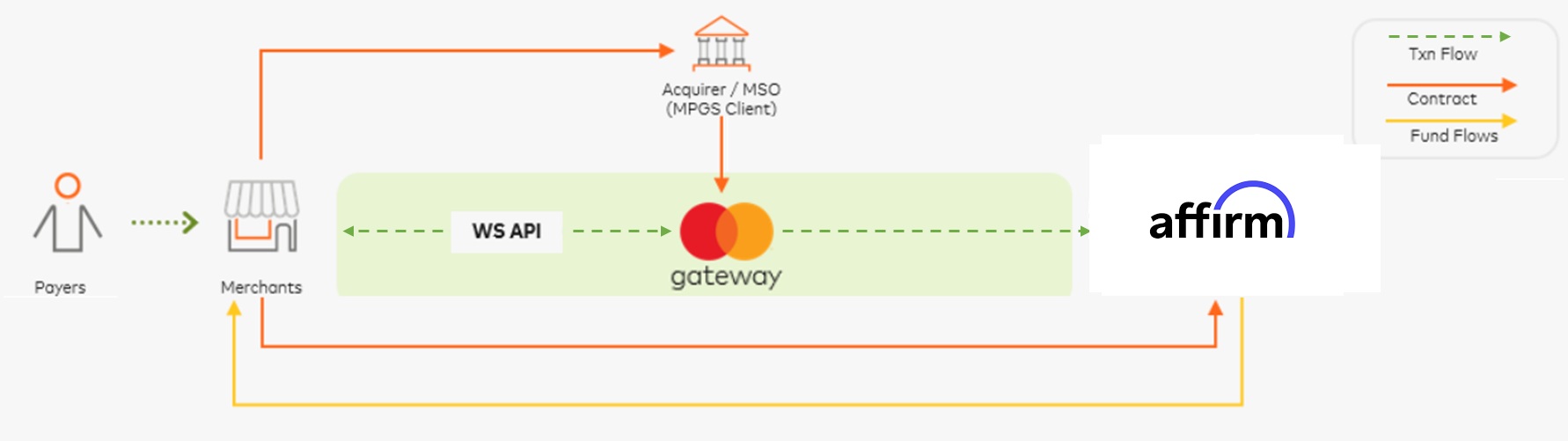
Affirm payments integration
Affirm payments through Direct Payment
Affirm paymennts through Drect Payment includes:
- Direct Payment integration allows you to offer Affirm payments on your own checkout page.
- Affirm payments is supported from the WS-API version 100 onwards.
- Make an Initiate Browser Payment request where
sourceOfFunds.browserPayment.type = AFFIRMandbrowserPayment.operation = PAY.
AffirmPay Transactions
| Transaction details | Value |
|---|---|
| Payment type | BNPL |
| Supported countries | CANADA, USA |
| Supported currencies | CAD, USD |
| Supported operations | PURCHASE (PAY), FULL REFUND, PARTIAL REFUND |
| Minimum Transaction Amount | 0 |
| Maximum Transaction Amount | 1000000000000 |
| Refund Validity | Not applicable Refunds are not available through Mastercard Gateway |
| Chargeback | Not applicable |
| Transaction validity period | Five minutes Default timeout period is five minutes and if any value, such as one minute is configured in merchant portal, then it becomes six |
Payment Options Inquiry
You can use a Payment Option Inquiry (POI) request to retrieve the payment options available to them and their associated attributes. The POI response can contain information about mandatory and optional fields, in addition to standard fields, limits, and general payment plan offer information for BNPL payment methods.
POI request
Post https://{{remotehost}}.gateway.mastercard.com/api/rest/version/llaatteesstt/merchant/OPTTY_MER1/paymentOptionsInquiry
POI response
{
  "merchant": "OPTTY_MER1",
  "paymentTypes": {
    "browserPayment": [
      {
        "currencies": [
          {
            "currency": "USD"
          }
        ],
        "description": "Affirm is a BNPL provider. It operates in the United States, Canada and Great Britain",
        "displayName": "Affirm",
        "logoUrl": "https://test-regression-brand1.qa06.gateway.mastercard.com/bpui/bp/logo/cb83b6d3-1322-47b8-9a5d-a1ca5ad61b43_AFFIRM.svg",
        "maxAmount": 1000000000000,
        "minAmount": 0,
        "paymentPlanOffer": [
          {
            "currency": "USD",
            "customerFee": false,
            "interestRate": 0,
            "lateFee": false,
            "paymentAmount": 0,
            "timeBetweenPayments": {
              "count": "12",
              "unitOfMeasure": "MONTH"
            }
          }
        ],
        "standardPayerData": [
          {
            "fieldName": "PHONE",
            "presence": "OPTIONAL"
          },
          {
            "fieldName": "EMAIL",
            "presence": "OPTIONAL"
          },
          {
            "fieldName": "BILLING_ADDRESS",
            "presence": "OPTIONAL"
          },
          {
            "fieldName": "SHIPPING_ADDRESS",
            "presence": "OPTIONAL"
          },
          {
            "fieldName": "FIRST_NAME",
            "presence": "OPTIONAL"
          },
          {
            "fieldName": "LAST_NAME",
            "presence": "OPTIONAL"
          }
        ],
        "supportedCountries": [
          {
            "country": "USA"
          }
        ],
        "type": "AFFIRM"
      }
    ]
  },
  "result": "SUCCESS",
  "supportedPaymentOperations": [
    {
      "supportedPaymentOperation": "PURCHASE"
    }
  ]
}
Specific parameter fields
Along with the standard fields that are required for a browser payment request, include the parameter fields in the Initiate Browser Payment request for AffirmPay.
| Parameters Name | Mandatory or Optional | Description |
|---|---|---|
| customer.email | Optional | Payer email information |
| customer.firstName | Optional | Payer first name |
| customer.lastName | Optional | Payer last name |
| customer.phone | Optional | Payer phone number |
| billing.address | Optional | Billing address information |
| shipping.address | Optional | Shipping address information |
| item | Optional | Item details for the transaction |
| order.currency | Mandatory |
Initiate Affirm payments request
{
  "apiOperation": "INITIATE_BROWSER_PAYMENT",
  "billing": {
    "address": {
      "city": "Edinburgh",
      "company": "MPGS",
      "country": "USA",
      "stateProvince": "CA",
      "street": "OceanPoint",
      "street2": "OceanDrive",
      "postcodeZip": "12345"
    }
  },
  "shipping": {
    "address": {
      "city": "Edinburgh",
      "company": "MPGS",
      "country": "USA",
      "stateProvince": "CA",
      "street": "OceanPoint",
      "street2": "OceanDrive",
      "postcodeZip": "12345"
    }
  },
  "browserPayment": {
    "operation": "PAY",
    "returnUrl": "{{remotehost}}/api/documentation/integrationGuidelines/index.html"
  },
  "customer": {
    "account": {
      "id": "customerAccount"
    },
    "dateOfBirth": "1999-12-31",
    "email": "developer+au@optty.com",
    "firstName": "Akash",
    "lastName": "Mali",
    "nationalId": "nationalId1",
    "phone": "415-333-4568"
  },
  "order": {
    "reference": "TEST-SUCCEED",
    "amount": "9.00",
    "itemAmount": "9.00",
    "currency": "USD"
  },
  "sourceOfFunds": {
    "browserPayment": {
      "type": "AFFIRM"
    },
    "type": "BROWSER_PAYMENT"
  }
}
Initiate AffirmPay payment response
{
  "billing": {
    "address": {
      "city": "San Francisco",
      "company": "MPGS",
      "country": "USA",
      "postcodeZip": "94105",
      "stateProvince": "CA",
      "street": "OceanPoint",
      "street2": "OceanDrive"
    }
  },
  "browserPayment": {
    "interaction": {
      "status": "INITIATED",
      "timeInitiated": "2025-11-17T13:52:04.233Z"
    },
    "operation": "PAY",
    "redirectHtml": "<div id="initiateRedirect" xmlns="http://www.w3.org/1999/html"><iframe srcdoc="<script src='https://sandbox.affirm.com/products/checkout?public_api_key=0GP5H1EYSK15KYIP&checkout_ari=1PHBRSS7JOGVKF61&locale=en_US&country_code=USA'>window.top.location.href='https://sandbox.affirm.com/products/checkout?public_api_key=0GP5H1EYSK15KYIP&checkout_ari=1PHBRSS7JOGVKF61&locale=en_US&country_code=USA';</script>" id="redirectFrame" name="redirectFrame" height="100%" width="100%"></iframe></div>",
    "returnUrl": "{{remotehost}}/api/documentation/integrationGuidelines/index.html"
  },
  "customer": {
    "account": {
      "id": "customerAccount"
    },
    "email": "developer+au@optty.com",
    "firstName": "Akash",
    "lastName": "Mali",
    "nationalId": "nationalId1",
    "phone": "415-333-4568"
  },
  "gatewayEntryPoint": "WEB_SERVICES_API",
  "merchant": "OPTTY_MER1",
  "order": {
    "amount": 9,
    "chargeback": {
      "amount": 0,
      "currency": "USD"
    },
    "creationTime": "2025-11-17T13:52:04.193Z",
    "currency": "USD",
    "id": "2165548091",
    "itemAmount": 9,
    "lastUpdatedTime": "2025-11-17T13:52:05.859Z",
    "merchantAmount": 9,
    "merchantCurrency": "USD",
    "reference": "TEST-SUCCEED",
    "status": "INITIATED",
    "totalAuthorizedAmount": 0,
    "totalCapturedAmount": 0,
    "totalDisbursedAmount": 0,
    "totalRefundedAmount": 0
  },
  "response": {
    "acquirerCode": "ACCEPTED",
    "gatewayCode": "SUBMITTED",
    "gatewayRecommendation": "NO_ACTION"
  },
  "result": "SUCCESS",
  "shipping": {
    "address": {
      "city": "San Francisco",
      "company": "MPGS",
      "country": "USA",
      "postcodeZip": "94105",
      "stateProvince": "CA",
      "street": "OceanPoint",
      "street2": "OceanDrive"
    }
  },
  "sourceOfFunds": {
    "browserPayment": {
      "type": "AFFIRM"
    },
    "type": "BROWSER_PAYMENT"
  },
  "timeOfLastUpdate": "2025-11-17T13:52:05.859Z",
  "timeOfRecord": "2025-11-17T13:52:04.225Z",
  "transaction": {
    "acquirer": {
      "id": "OPTTY_QA_TESTACQ1",
      "merchantId": "R1BXsx0cmZCms6ir"
    },
    "amount": 9,
    "currency": "USD",
    "id": "9234485063",
    "source": "INTERNET",
    "stan": "0",
    "type": "PAYMENT"
  },
  "version": "100"
}
Interpretation of the transaction result
This table shows the transaction response codes for the possible scenarios that you may encounter after initiating the Affirm payments.
| Initiate browser payment response | What this means |
|---|---|
response.gatewayCode=SUBMITTED result=SUCCESS |
Redirect the payer using the URL provided in the response. |
| Retrieve transaction or Retrieve order response | What this means |
|---|---|
response.gatewayCode=APPROVED result=SUCCESS |
The payment is successful. |
response.gatewayCode=PENDING result=PENDING |
Mastercard Gateway is waiting for a notification from the acquirer about the payment result. Try RETRIEVE_TRANSACTION again later or listen for notifications from Mastercard Gateway. |
response.gatewayCode=CANCELLEDresult=FAILURE |
The payer has cancelled the interaction for this payment. Offer the payer the option to try another payment method. |
response.gatewayCode = DECLINED or ACQUIRER_SYSTEM_ERROR result=FAILURE |
The payment was declined. Offer the payer to try another payment method. If the response is ACQUIRER_SYSTEM_ERROR, contact the acquirer for the reason or try RETRIEVE_TRANSACTION again. |
response.gatewayCode = TIMED_OUT result=FAILURE |
Treat this as a declined payment. Mastercard Gateway ensures the transaction is not successful or will revert it. |
AffirmPay through Hosted Checkout
Hosted Checkout integration allows you to collect payment details from your payer through an interaction that the gateway hosts and displays. From the API version 85 and later, AffirmPay payments is automatically available as a payment method once your payment service provider enables and configures you for this payment method. For more information, see Browser Payments through Hosted Checkout integration.
Webhook notifications
If you have subscribed to Mastercard Gateway webhook notifications, you will receive additional notifications on the paymentStatus.